Skip to content
Video review

No more emails, texts and calls.

Client video review and approval, down to the frame.

All your feedback in one place. Frame-accurate comments, ready to export as markers to DaVinci Resolve or Final Cut Pro. Author and Studio plans

rodrigomarquez.positiva.studio/g/must-have-nyc
A real review gallery · comment pinned to the frame
How it works

From the link to your timeline. Author and Studio plans

01

Upload the cut and send your link

Create a proofing gallery and share the link, under your brand. It's always the same link: it never expires and doesn't change when you upload a new version.

02

Your client comments on the frame

They pause where they want, type, and the comment is pinned to that exact moment of the video. From any browser, without creating an account.

03

The notes land in your editor

Export the comments as markers for DaVinci Resolve or Final Cut Pro. You fix each note on your timeline instead of decoding an email.

The player

Comments that land exactly where they belong.

The video is reviewed in the player, with every comment marked on the timeline. No loose screenshots, emails or texts: each note knows which frame it belongs to, and one click takes you there. Resolve them as you go, and what's left open is what's still to do. Author and Studio plans

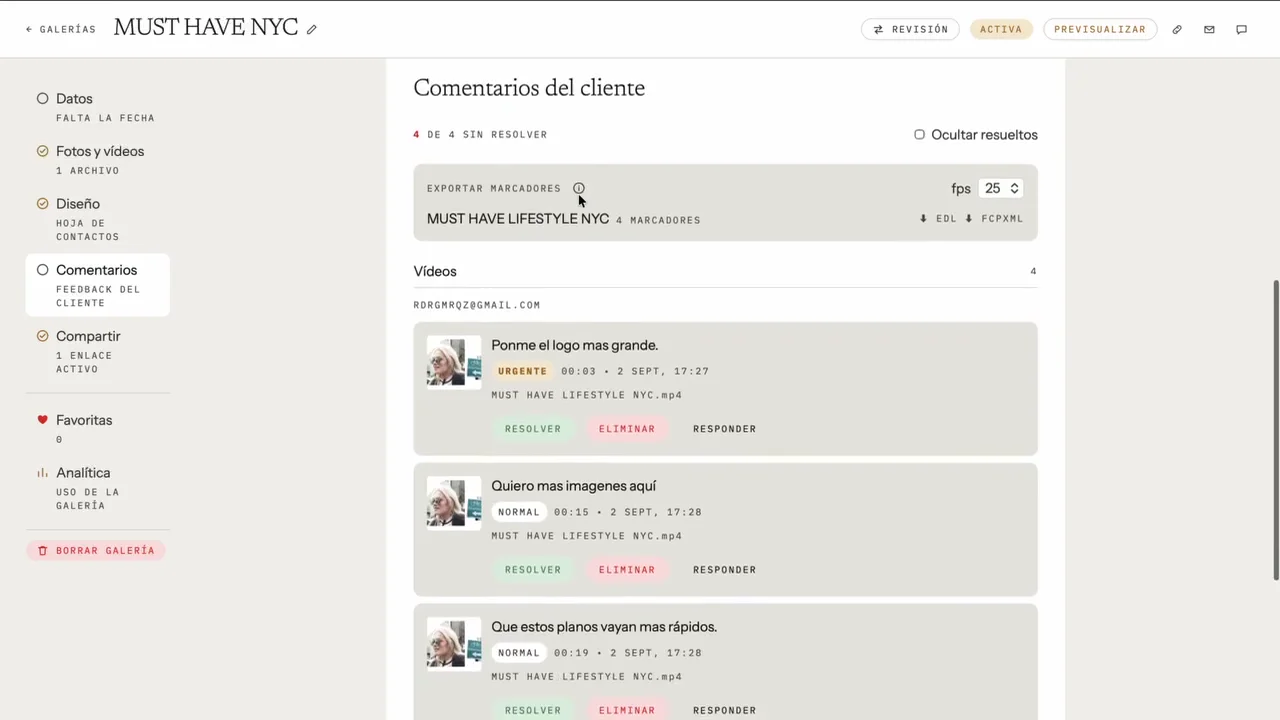
Gallery dashboard with the client's comments, each with its timecode and priority
Your dashboard · every comment with its timecode and priority
Into your editor

From comment to marker.

When the round of feedback is in, export the comments and open them in DaVinci Resolve (EDL) or Final Cut Pro (FCPXML): they show up as markers on your timeline, on their frame, with the client's words. You make each fix with the note right in front of you. Author and Studio plans

Marker export · DaVinci Resolve and Final Cut Pro
Rounds and versions

Every round, under control.

Set up proofing rounds with your client. When they finish a round, you get one notification with everything in it, not a trickle of late-night changes. Studio plan

Upload the corrected cut to the same link and pick up where you left off.

Your dashboard · rounds, comments and versions

Rounds

Your client clicks “I've finished this round” and you get the whole batch. Every round stays on record: what was asked for, what was changed. Studio plan

Versions

Replace the video without changing the link. Earlier versions are kept with their comments, and anyone can play them again in the same player if you need to go back.

Who sees what

Collaborative mode, where everyone sees everyone's comments, or Individual, where each reviewer only sees their own. You choose per gallery.

Delivery

Video deserves a beautiful delivery too.

Once the cut is approved, the same gallery becomes the delivery, with layouts built for video: Premiere, Poster, Showcase, Montage or Video library, with your fonts and your colors. Your client gets a premiere, not a file download.

Delivery layouts
Video layouts · Premiere, Poster, Showcase, Montage and Video library
FAQ

The ones that matter.

Does my client need an account to review the video?

No. They open your link, confirm their email and can start commenting. The confirmation is there so every comment has an author and nobody gets in without permission. The gallery shows in English or Spanish based on their browser, and they can switch.

Is video billed separately from photos?

No. Photos and video share the same storage on your plan. There are no "video hours" and no separate product. Video review and marker export are part of the Author and Studio plans.

How do comments get into DaVinci Resolve or Final Cut Pro?

You export them from Positiva as a marker file, EDL for DaVinci Resolve or FCPXML for Final Cut Pro, and import it into your project: each comment appears on the timeline, on its frame, with its text. There's no plugin and no live sync: if your client adds comments later, you export again. Markers are exported at 24, 25 or 30 fps; 23.976 and 29.97 fps aren't supported. Author and Studio plans

What happens when I upload the corrected cut?

You replace the file and your client's link stays the same. Earlier versions are kept with their comments, so you can go back to them.

Can several people review the same video?

Yes. And you pick the mode: Collaborative, where everyone sees everyone's comments, or Individual, where each reviewer only sees their own.
Book a demo

Review your next video without decoding emails.

Positiva is best shown live. Book a demo and I'll walk you through it on your own workflow, no strings attached. And if you'd rather explore on your own, sign up and get started today.

No commitment and no newsletter: I'll only email you to schedule it.